Skip to content
Spudlet

Your person, at a glance

Couple widgets for iPhone. A little closer, every day.

Spudlet gives two people a little world to share. Its iPhone widgets bring your Spud, shared moods and little gestures onto your Home Screen, with a smaller Spud companion for the Lock Screen.

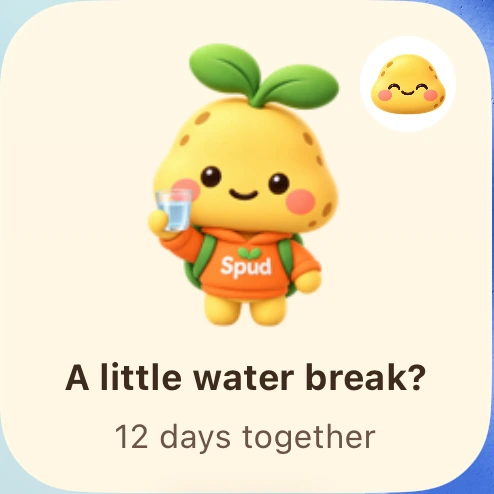
Actual small Spud Home Screen widget showing a little water break and the shared Spud mascot
A real Spud Home Screen widget, with a little water-break moment.

More “thinking of you”. Less finding the words.

You’re in different places, or just having different kinds of days. Share your mood, send a poke, or leave a little water-break reminder in Spudlet. A widget keeps a piece of that connection close.

You each install the app and connect with an invitation. The widgets reflect your real shared moments, rather than sending messages to strangers or posting to a feed.

Three little ways to keep them close.

Spud

Small & medium Home Screen · Circular & rectangular Lock Screen

Your shared little potato, with a snapshot of your connection. Home Screen layouts can show a care moment and the latest shared mood. What you see depends on the widget size and the moment waiting for you.
Our little week

Medium Home Screen

A little week of both your shared moods, side by side. A glance at the days you checked in, with space for the days you haven’t shared yet.

Little things we sent

Medium Home Screen

A small calendar of the care you exchanged, including pokes, hearts and break invitations. Little gestures add up to a shared story.

For your partner.

A shared mood between meetings. A little hello across time zones. A break invitation when your days feel too full. Small things can make the distance feel a little less ordinary.

For your favourite friend, too.

Your person might be a best friend, sibling or someone you want to check in with. Spudlet pairs two people; you don’t need to label your connection.

A few little questions.

Do we both need Spudlet?
Yes. Install Spudlet on both iPhones, connect using an invitation, and add the widget on each phone. Your widget reads your paired space.
Can I respond from a widget?
Supported Home Screen layouts can offer an action for an incoming care moment. Available buttons depend on the message and widget size. Some interactions open the app; the compact Lock Screen widgets have less room.
Do changes appear instantly?
Not always. iOS manages when widgets refresh, and network access matters too. The app and supported pushes can request an update, but a widget is a snapshot, not an always-open live connection.
Is a Live Activity the same as a widget?
No. A widget stays where you add it. A Live Activity is a temporary card for a supported ongoing moment, such as a shared break. Dynamic Island presentation also depends on your iPhone model.
Where do I start?
Follow the Spudlet widget setup guide. It covers both Home Screen and Lock Screen steps, plus a few things to check if Spud hasn’t appeared.

A few more little things.

Your person. Your potato. Your little world.

Spudlet is a little space for two people to share moods, send care and keep each other close.

Download on the App Store